Plans & Credits
StitchKit offers four subscription tiers: FREE, STARTER, PRO, and ULTIMATE. You can see what each tier unlocks on the "Subscription" page in the left-hand menu. Each tier includes everything in the one below it — so every plan builds on its predecessor with additional features. You can pay monthly ("Monthly") or annually ("Annual"); as the page notes, annual billing saves you up to 37%, and every plan comes with a 30-day money-back guarantee.
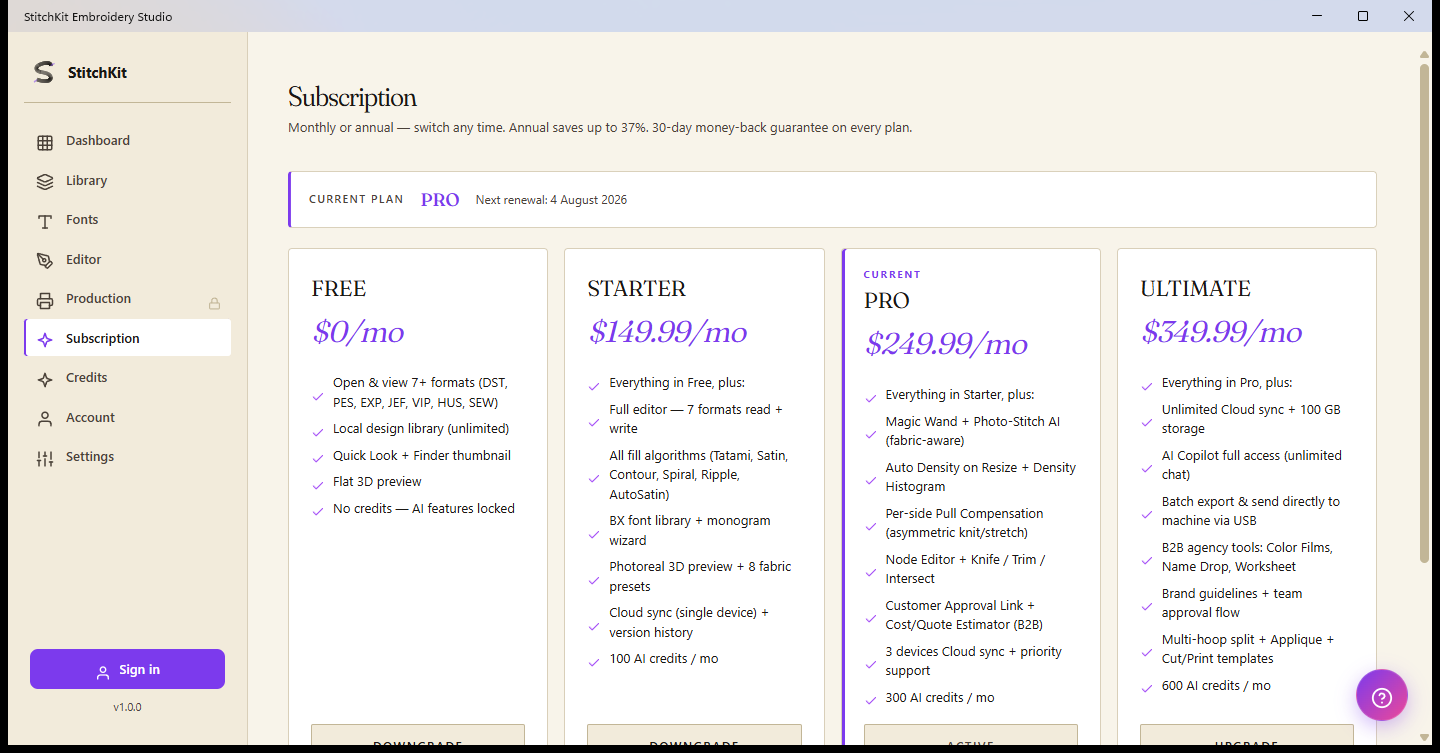
The "Subscription" page — four plan cards, the current-plan bar ("CURRENT PLAN"), and remaining AI credits in the top right (⚡ 775).
The four plans — price and summary
- FREE — $0/mo. A "preview" mode that requires no purchase. Open and view 7+ formats (DST, PES, EXP, JEF, VIP, HUS, SEW), an unlimited local design library, "Quick Look" + Finder thumbnails, and a "Flat" 3D preview. No AI credits — AI features are locked.
- STARTER — $149.99/mo. The full editor: read and write all 7 formats. Every fill algorithm (Tatami, Satin, Contour, Spiral, Ripple, AutoSatin), a BX font library + monogram wizard ("Monogram Wizard"), Photoreal 3D preview + 8 fabric presets, single-device Cloud sync + version history. 100 AI credits per month.
- PRO — $249.99/mo. "Magic Wand" + fabric-aware "Photo-Stitch AI", auto density on resize ("Auto Density on Resize") + a density histogram, per-side pull compensation ("Per-side Pull Compensation"), the Node Editor + "Knife / Trim / Intersect", a customer approval link + "Cost/Quote Estimator" (B2B), and 3-device Cloud sync + priority support. 300 AI credits per month.
- ULTIMATE — $349.99/mo. Unlimited Cloud sync + 100 GB storage, full "AI Copilot" access (unlimited chat), batch ("Batch") export and direct send-to-machine over USB, B2B agency tools ("Color Films", "Name Drop", "Worksheet"), brand guides + team approval workflow, multi-hoop split ("Multi-hoop split") + appliqué ("Applique") + cut/print ("Cut/Print") templates. 600 AI credits per month.
Plan comparison table
The table below shows the tier from which each feature is unlocked. If a feature is available at one tier, it's also available at every tier above it.
| Feature | FREE $0/mo | STARTER $149.99/mo | PRO $249.99/mo | ULTIMATE $349.99/mo |
|---|---|---|---|---|
| Open / view formats (7+) | ✓ DST, PES, EXP, JEF, VIP, HUS, SEW | ✓ | ✓ | ✓ |
| Write / export formats (save) | ✗ | ✓ write to 7 formats | ✓ | ✓ |
| Fill algorithms | ✗ | ✓ Tatami, Satin, Contour, Spiral, Ripple, AutoSatin | ✓ + advanced/custom parameters | ✓ |
| BX font library / monogram wizard | ✗ | ✓ "Monogram Wizard" | ✓ | ✓ |
| Photoreal 3D preview | ✗ ("Flat" 3D only) | ✓ + 8 fabric presets | ✓ | ✓ |
| "Magic Wand" / "Photo-Stitch" AI | ✗ | ✗ | ✓ fabric-aware | ✓ |
| "Auto Density on Resize" + histogram | ✗ | ✗ | ✓ | ✓ |
| Pull compensation ("Pull Compensation") | ✗ | ✓ basic (automatic) | ✓ per-side ("Per-side") | ✓ |
| Node Editor + "Knife / Trim / Intersect" | ✗ | ✗ | ✓ | ✓ |
| Cloud sync — device count | ✗ | ✓ 1 device + version history | ✓ 3 devices + priority support | ✓ Unlimited + 100 GB |
| Send directly to machine over USB | ✗ | ✗ | ✗ | ✓ "Send to Machine" + batch ("Batch") export |
| B2B tools | ✗ | ✗ | ✓ Approval link + "Cost/Quote Estimator" | ✓ + "Color Films", "Name Drop", "Worksheet", brand guides |
| AI credits / month | ✗ 0 (AI locked) | ✓ 100 | ✓ 300 | ✓ 600 |
Tip — The PRO card is highlighted on the page with a "Recommended" badge; it's the most balanced set for small shops and B2B users.
What AI credits are for
AI credits are a meter you spend on AI operations that run server-side. The main uses are auto-digitizing (auto-digitize) and AI-assisted tools — for example, generating stitches from a photo with "Photo-Stitch", "Magic Wand", "AI Copilot" chat, and semantic search ("Semantic Search"). Plain editor operations that don't consume credits (drawing a block by hand, moving it, converting a format) aren't deducted from this meter.
- Monthly quota. Each plan comes with a monthly AI credit allowance (the values shown on the page): FREE 0, STARTER 100, PRO 300, ULTIMATE 600. Before an AI operation starts, the credits it needs are reserved; if the operation fails the credits are refunded, and only completed operations are deducted.
- Remaining display ("remaining / quota"). Your remaining credits appear throughout the app as "remaining / quota" — in the ⚡ badge in the top right (the same counter on the "Dashboard" and in the library). When you buy a one-time pack, your balance can exceed your monthly quota; that's why on PRO (quota 600) you might see a remaining balance higher than the quota on screen, e.g. "775 / 600" — the surplus is the extra credits you purchased.
- Top-up / "Add Credits". When your monthly allowance runs out, you buy a one-time pack from the "Credits" page. The packs shown on screen are: 100 credits ($45), 500 credits ($145, −35%), 2,000 credits ($395, −56%, "Best Value") and 5,000 credits ($745, −66%). Purchased credits don't expire and roll over, and they're added on top of your monthly tier credits (on the "Credits" page the balance is broken out as "(tier + purchased)").
Note — The monthly credit figures shown on the page (STARTER 100, PRO 300, ULTIMATE 600) are taken from the marketing cards and are the values this guide relies on. The internal cap in the app's code (
SubscriptionService.AiCreditsMax) differs for some tiers (Free 5, Starter 100, Pro 600, Ultimate 2500). If one day the remaining count on screen looks different from what you expected, this internal inconsistency may be why; always go by the current figure shown on the "Subscription" and "Credits" pages.
How to upgrade
- Open the "Subscription" page from the left-hand menu.
- If you like, choose your billing period with the "Monthly" / "Annual" toggle at the top (annual shows the discounted price).
- Click the button on the card for the plan you want to switch to: "Upgrade" for a higher tier, "Downgrade" for a lower one. On your current plan the button reads "Active" and is disabled.
- Confirm the purchase on the store checkout screen that opens. Once confirmed, the new features ("Editor", "Dashboard", etc.) unlock right away.
- To manage your current subscription, view the billing period, or cancel, use the "Manage" (Manage ↗) button on the plan bar at the top.
Billing through the App Store
- On Apple platforms (Mac, iPad/iPhone) and on Android, payment is handled through the device's own store ("App Store" / Google Play). On these platforms, plan changes and cancellation are done from that store's subscription settings — which is why, on Apple devices, "Manage" takes you straight to the App Store's subscription screen.
- On the desktop (Windows) there's no native store, so payment is completed on a secure web checkout page (Paddle); this requires a signed-in account.
- As noted in the info text on the page, subscriptions renew automatically every month until you cancel. When you cancel, your access continues until the end of the current billing period.
Tablet — On iPad, all the plan cards and the checkout flow are identical; the purchase goes through the device's App Store account.
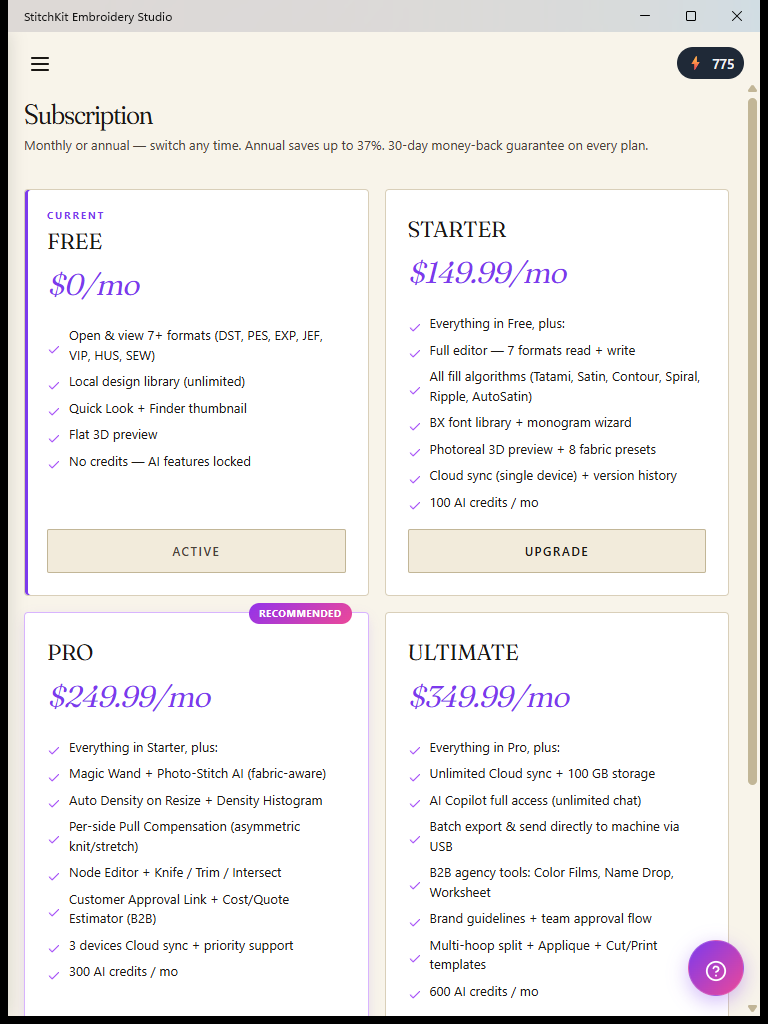
The "Subscription" page in the tablet view.
Note — marketing cards vs. actual access — The feature lists on the "Subscription" page are for marketing purposes; some features may unlock on an earlier plan than listed. For example, "Applique" and auto density on resize (Auto Density on Resize) kick in on Starter, and "Multi-hoop split" on Pro. The definitive sign of whether a button is actually locked is the lock/badge on screen and the upgrade (paywall) screen that appears when you tap it. Also, the "PRO" label on a lock badge is a generic "higher plan" marker; the feature in question may unlock on a lower paid plan (e.g. Photoreal preview on Starter).